


.png)
I get asked a lot whether InvoiceMax is a Kofax alternative. The honest answer is: for accounts payable, yes. For enterprise-wide automation across every document type in the building, that is a different conversation.
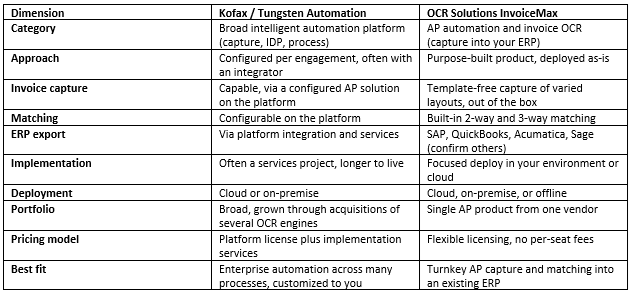
OCR Solutions InvoiceMax is the AP product we built: it reads invoices of all kinds of layouts, pulls header data, line items, and totals, runs 2-way and 3-way matching, routes the low-confidence fields for review, and exports clean data into your ERP. Kofax, now Tungsten Automation, is a broad intelligent automation platform. Document capture, intelligent document processing, and process automation all sit under one roof, and invoice processing is usually something you and an integrator configure on top of that platform.
Both can get an invoice off a PDF or scan and into your books without someone retyping every line. Where they diverge is shape. Tungsten is a wide platform you customize per engagement. InvoiceMax is a finished AP product you deploy for that job. This page walks through that difference without pretending there is one winner for every company. For the wider picture of where InvoiceMax sits in an AP stack, see our AP automation overview.
Before the differences, the overlap matters. Both automate the front of accounts payable: capture the invoice, extract the fields people used to key by hand, match against purchase orders when you need that, and push the result toward accounting. Both handle varied layouts. Both run at volume. Both can sit on-premise. Both leave an audit trail.
If your only goal is “stop typing invoices and check them against POs,” either path can get you there. The real decision is how you get there: build an AP solution on a platform, or stand up a product that already is one.
Kofax earned its reputation in capture and automation over a long stretch, and a fair comparison starts by saying that out loud.
If you want one automation platform across many processes, and you have the team and budget to configure it, Kofax is a strong default. Nothing below argues otherwise.
In our conversations with finance and IT teams, the search for analternative usually starts when one of these frictions shows up. These are about effort and shape, not about whether the capture engine can read a page.
That is the gap we built InvoiceMax to fill: AP as a finished product, not a platform project.
We founded OCR Solutions in 2004. Alongside ID reading andmedical-claims products, we build InvoiceMax for the whole capture-to-exportpath in accounts payable: read the invoice accurately, match it, flag theexceptions, and hand clean data to your ERP.
We do not publish a marketing accuracy percentage or a public price list on this page, because those numbers only mean something against your invoices and your volumes. A trial on your own documents is the honest proof point.
This is the core difference, and it is the one I care about most when someone is comparing us.
Kofax is a platform. Its strength is that it can be configured to fit almost any capture and automation process. That is what you want when you are automating many different workflows across an enterprise. The trade-off is that accounts payable is something you design and build on the platform, usually with an integrator. There is a project between buying it and running invoices through it, and there is a platform to administer afterward.
InvoiceMax is the opposite shape: a finished product for one job. Capture, matching, exception routing, and ERP export are already assembled. It can run on-premise or offline in your own environment. For a finance team whose need is invoice processing into an existing ERP — not a company-wide automation platform — that means less to design, less to maintain, and a shorter path from invoice to posted entry.
I am not going to invent sticker prices here. Published figures are limited on both sides, and the all-in number depends on volume and how custom the process is.
Kofax follows enterprise platform pricing: a license for the automation platform plus the implementation services to configure it for your process. Theall-in cost is platform plus project.
InvoiceMax uses flexible licensing rather than per-seat SaaS, witha finished AP product rather than a build. Cost does not climb simply because you add reviewers, and you are not paying for an integration project just to get a working invoice workflow.
Which model is cheaper depends on your volumes, team size, and how unusual your process is. A like-for-like quote from both sides is the only honest comparison.
Is OCRSolutions InvoiceMax a Kofax alternative?
For accounts payable, yes. InvoiceMax is purpose-built AP automation and invoice OCR: it reads invoices, runs 2-way and 3-way matching, routes exceptions, and exports to your ERP as a finished product. Kofax, now Tungsten Automation, is a broad platform configured into an AP solution per engagement. If you want a focused tool you deploy rather than a platform you build on, we are the closer fit.
Is Kofax the same as Tungsten Automation, Ephesoft, or Nuance OmniPage?
Kofax rebranded to Tungsten Automation. Over the years the company absorbed several capture and OCR products, including Ephesoft and the Nuance OmniPage engine, as well as Simple OCR. If you are comparing any of those names, you are looking at parts of the same broad portfolio. InvoiceMax is a single purpose-built AP product, not a stack of acquired engines.
What is the difference between a platform configured per engagement and a purpose-built tool?
A platform like Kofax is shaped into your AP process during implementation, usually with an integrator, so there is design and build before invoices run. A purpose-built tool like InvoiceMax arrives with capture, matching, exception routing, and ERP export already assembled. The work is deployment and your business rules, not building the workflow itself.
Does InvoiceMax do 2-way and 3-way matching?
Yes. Matching against purchase orders and receipts is built in, so invoices are checked before they reach your ERP. On the Kofax platform, matching is configured as part of the AP solution built for you.
Which ERPs does InvoiceMax export to?
We export to ERP systems including SAP, QuickBooks, Acumatica, and Sage. If you run NetSuite, Microsoft Dynamics, or Xero, ask us directly so we can confirm against your version and export path.
Can InvoiceMax run on-premise or offline?
Yes. On-premise and offline are supported so invoice and vendor data can stay inside your environment. Kofax can also deploy on-premise; the difference is that we deliver the AP workflow as a finished product rather than a configured platform.
How accurate is InvoiceMax invoice capture?
We do not publish a single accuracy percentage on this page, because the number only means something against your invoice mix. InvoiceMax reads varied layouts without per-vendor templates and routes low-confidence fields for review. The fair test is a trial on your own documents.
Kofax, now Tungsten Automation, and InvoiceMax solve the same job at different shapes. One is a broad automation platform you configure into an AP solution. The other is a purpose-built AP product you deploy as-is. If you are automating many processes across the enterprise and have the team and budget to configure a platform, Kofax earns its breadth. If your need is accounts payable into an existing ERP, the focused tool is faster to stand up and lighter to run.
Choose Kofax when you want broad enterprise automation customized to your processes. Choose InvoiceMax when you want purpose-built invoice capture with built-in matching and ERP export.
Request a trial and run InvoiceMax against a sample of your real invoices. You will see capture, matching, and export on your own layouts, without configuring a platform first.
Already on Kofax or Tungsten Automation? You do not have to rip anything out to evaluate. Test InvoiceMax capture and matching alongside your current setup. When you are ready to plan an actual move for accounts payable, our AP migration guide walks through the switching costs and the steps.
