


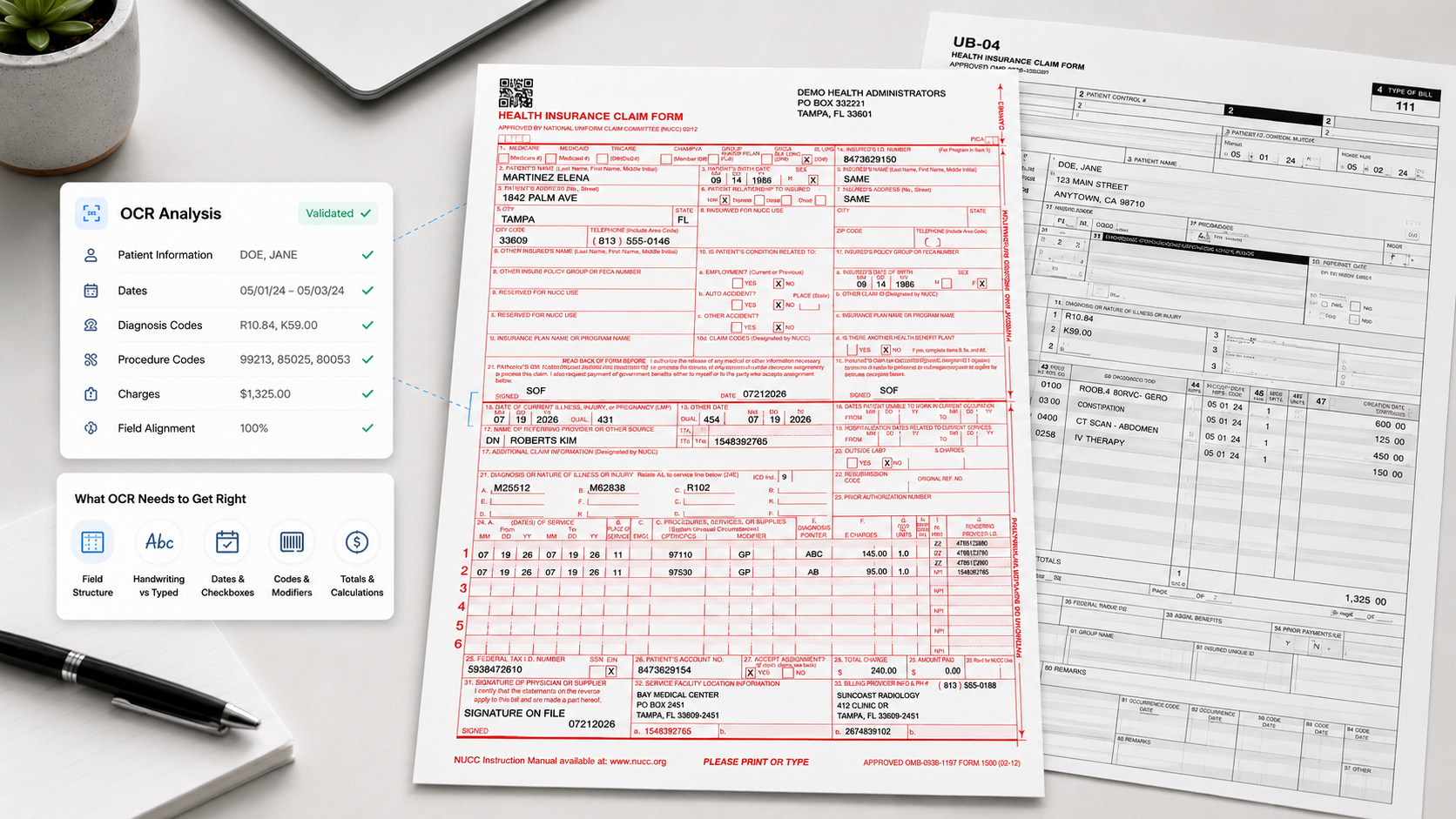
CMS-1500 and UB-04 are the two standard claim forms used in medical billing across the United States. CMS-1500 (also called HCFA-1500) handles professional claims -- physician visits, outpatient services, labs. UB-04 (also known as CMS-1450) handles institutional claims -- hospital stays, emergency departments, facility-based services. Together, they account for the vast majority of medical claims submitted to payers.
OCR on these forms is not the same as OCR on an invoice or a receipt. A general-purpose OCR engine will read the characters on a CMS-1500 just fine. But reading characters and processing a medical claim correctly are two completely different problems. The form structure, the field dependencies, the validation rules, and even the physical scanning requirements are specific to each form type. Getting any of that wrong means a denied claim.
Most people outside of claims processing don't realize how structurally different these two forms are, even though they serve a similar purpose.
A CMS-1500 is a single-page form with 33 numbered boxes. The layout is fixed and has barely changed since the 02/12 version was adopted in 2012. Box 21 contains the diagnosis codes (ICD-10). Boxes 24A through 24J contain the line-item service details -- procedure codes, modifiers, diagnosis pointers, charges. Box 33 is the billing provider. Every field has a defined position, and the relationships between fields follow strict rules: the diagnosis pointer in Box 24E must reference a valid code in Box 21, or the claim gets rejected.
A UB-04 is a wider, denser form with 81 form locators. Institutional claims carry more complexity because they describe entire episodes of care, not individual services. Form locators 42 through 47 operate as row-level units -- revenue code, service description, service date, units, total charges, and non-covered charges must all align within each row. A single misread in the revenue code throws off the entire row, and payers will reject the claim rather than guess which field is wrong.
The OCR system needs to understand these structural differences. Template-based extraction handles this by mapping predefined field coordinates for each form type, which is how you get 99% accuracy on structured medical forms. But the mapping is only the starting point.
Here is something that rarely shows up in vendor comparison sheets but makes a massive difference in real-world accuracy.
The standard CMS-1500 form is printed with red ink on white paper. The red ink defines the boxes, labels, and structure of the form. The typed or handwritten data sits on top of that red template. When you scan a CMS-1500 with a normal scanner, the OCR engine sees everything together -- the form structure and the data, overlapping and competing for attention. Accuracy suffers because the engine has to separate what's data from what's template.
Red dropout scanning solves this by removing the red ink during the scan itself. The scanner is calibrated to filter out the specific red frequency used on CMS-1500 forms, so the resulting image shows only the typed or handwritten data on a clean white background. The OCR engine never has to deal with the template at all.
The accuracy difference is not subtle. On a Texas Medicaid deployment processing over 1 million claims per month, red dropout scanning on CMS-1500 forms is a foundational part of why the system achieves 99% field-level accuracy. Without it, even a good OCR engine will misread characters where the red box borders overlap with typed text, especially in dense sections like Box 24.
UB-04 forms do not use red dropout. The form is printed in black, so the scanning challenge is different -- mainly about handling the higher density of data and the row-level structure in form locators 42-47.
If you process CMS-1500 forms and your OCR vendor has never mentioned red dropout scanning or asked about your scanner calibration, that should tell you something about their experience with medical claims specifically.
Preprocessing is where a lot of claims OCR systems quietly succeed or fail, and most vendors treat it as an afterthought.
Claims arrive from everywhere: TIFF files from legacy practice management systems, smartphone photos uploaded through patient portals, faxes from rural clinics running 20-year-old machines, SFTP batch drops from clearinghouses. None of these arrive in perfect condition. Faxes have header artifacts and resolution degradation. Mobile scans have warping and uneven lighting. Legacy TIFFs can have compression artifacts that blur fine print.
Before the OCR engine touches a single field, the system needs to deskew rotated scans, normalize contrast on faded faxes, remove noise from fax headers and background textures, and flatten warped mobile captures. For faxed claims specifically, cleanup algorithms handle the worst of it, and overnight batch processing can run heavy cleanup on large fax volumes during off-hours.
This matters more for CMS-1500 than for most other form types because the form has fine print, tightly spaced boxes, and conditional logic across sections. A slight skew that's unnoticeable on an invoice can cause Box 24's line items to shift one row, mapping the wrong procedure code to the wrong diagnosis pointer. Preprocessing catches that before it becomes a denial.
Reading the characters correctly is maybe half the problem. The other half is knowing whether what you read actually makes sense in context.
A CMS-1500 might scan perfectly and produce a clean text extraction, but if Box 24D contains a CPT code and Box 24E points to a diagnosis in Box 21 that doesn't support medical necessity for that procedure, the claim will be denied. The OCR system read every character right. The claim is still wrong.
This is where medical claims processing separates from generic document OCR. The extraction engine needs to validate field dependencies, not just field contents. On CMS-1500, that means checking that NPI numbers in Box 33 follow the standard 10-digit format, that required modifiers in Box 24D are logically consistent with the service code and provider type, that diagnosis pointers in Box 24E reference valid ICD-10 codes that actually exist in Box 21, and that mandatory fields like billing address and date of service are not blank.
On UB-04, the validation is even more complex because of the row-level structure. Revenue codes in form locator 42 must align with the service description in FL 43, the units in FL 46, and the total charges in FL 47 -- per row. A misread in the revenue code doesn't just create one error. It cascades across the entire row and can trigger a rejection of the full claim.
The practical difference between OCR that validates and OCR that just extracts is the difference between catching these errors before submission and catching them after a denial notice arrives three weeks later. Fields below a configurable confidence threshold get routed to the verification station for human review, color-coded by confidence level: pink for low-confidence fields, blue for mandatory manual review. The human reviewer confirms or corrects flagged fields -- they're not re-entering the whole claim, just handling the exceptions. That's how you keep processing time under 60 seconds per claim even with the human-in-the-loop step.
Accurate extraction and validation don't matter if the data comes out in the wrong structure. CMS-1500 and UB-04 map to different EDI transaction sets:
CMS-1500 exports as 837P (Professional). UB-04 exports as 837I (Institutional). Dental claims (which use the ADA form, not covered here) export as 837D.
Beyond 837, most operations also need JSON, XML, or CSV for internal APIs, practice management systems, or third-party clearinghouse integrations. SQL connectors handle direct database connections to EHR/EMR systems without file-based transfers.
Every field must map correctly to the output schema. A syntactically valid 837 file with misplaced or empty segments will still get rejected by the payer. The export chain needs to carry not just the extracted data but also a reference to the original scanned document, metadata from validation and preprocessing, and a record of any manual edits made during verification -- which brings us to compliance.
Anyone who has been through a payer audit or CMS evaluation knows that accuracy alone doesn't protect you. You need traceability. If a field was manually edited during verification, the system must record who changed it, when, what the original OCR value was, and what it was corrected to.
This is not optional for HIPAA-regulated environments. Both cloud and on-premise deployments must maintain field-level change history natively. If your audit trail lives in a separate spreadsheet or a manual QA log, you have a compliance gap that will surface during an audit.
For BPOs and clearinghouses running multi-tenant setups, the audit trail must be isolated per client. Client A's verification edits must not be visible to Client B. Data segregation is a HIPAA requirement, and the audit system needs to respect it.
Claims arrive through more channels than most vendors account for. A mature OCR system for CMS-1500 and UB-04 needs to handle browser-based uploads from distributed billing teams, API endpoints for mobile captures and partner integrations, SFTP batch drops from legacy systems, and polling from scanner hot folders -- all feeding into the same processing pipeline.
The point is not just supporting multiple intake methods. It's standardizing them so that a CMS-1500 faxed from a rural clinic and a CMS-1500 uploaded through a web portal go through the same preprocessing, extraction, validation, and export workflow. Different intake channels should not create different processing paths.
Small practices processing a few hundred claims a month won't notice most of the issues described above. But at 10,000+ claims per day -- the scale that Medicaid processors, hospital billing departments, and large BPOs operate at -- small validation gaps create hundreds of rejected claims per batch.
The Texas Medicaid implementation processes over 1 million CMS-1500 and UB-04 forms per month and has been running for over four years. At that volume, the operation went from 150 staff to 80. The system handles parallel ingestion, stateless job processing, and intelligent queue management for the verification station. The lesson from that deployment: real performance isn't about how fast documents move through the pipeline. It's about maintaining field accuracy and compliance at scale without letting error rates creep up as volume increases.
For most organizations, the minimum volume for positive ROI is around 10,000-15,000 claims per month. The sweet spot is 50,000+.
CMS-1500 is a single-page form used for professional claims (physician visits, outpatient services, labs). It has 33 numbered boxes. UB-04 is a wider form with 81 form locators used for institutional claims (hospital stays, emergency departments, facility-based services). They map to different EDI formats: CMS-1500 exports as 837P and UB-04 exports as 837I.
The standard CMS-1500 form is printed with red ink. Red dropout scanning removes this red template during the scan, leaving only the typed or handwritten data on a clean white background. This dramatically improves OCR accuracy because the engine doesn't have to separate data from the form structure. Without red dropout, accuracy drops noticeably in dense sections like Box 24 where typed text overlaps with red box borders.
Template-based OCR achieves 99% field-level accuracy on both CMS-1500 and UB-04 forms. This assumes proper scanner calibration (including red dropout for CMS-1500), preprocessing to handle fax noise and scan quality issues, and field-level validation. Handwritten fields have lower accuracy and may require ICR or Amazon Textract at approximately $1 per scan.
Yes. The system identifies the form type automatically before extraction begins using layout anchors and structural fingerprinting. CMS-1500 and UB-04 forms can be mixed in the same batch -- the OCR applies the correct template and validation rules per form type without manual sorting.
CMS-1500 exports as 837P (Professional) and UB-04 as 837I (Institutional) for EDI submission to payers and clearinghouses. Both form types also support JSON, XML, CSV, and direct SQL connections for integration with EHR/EMR systems and practice management software.
